Git is a version control system: it records snapshots of your project over time, so you can see what changed, return to an earlier state, and work on parallel changes at once. You start a repository with git init, and from there Git tracks the files you tell it to.
Here is where the first commit goes wrong. You have a project, you want it under version control, and the instinct everyone follows is one line:
git initgit add .git commit -m "initial"It works, and it put two things into your history you never meant to keep. node_modules/, the tens of thousands of files your package manager installed, now tracked. And .env, the file holding your secrets, now committed. The repository is bloated, and the secret is in the history, the one place where deleting the file later does not take it back. Git makes committing everything a single keystroke and makes removing anything hard. Below, the same repo set up so neither happens, with the model that explains why.
Tell Git what to ignore, first
The fix starts before you stage anything. A .gitignore file at the root of the repo lists patterns, and any path that matches stays untracked: git add . skips it, and git status does not even mention it.
node_modules/.env.env.**.logbuild/Each line is a pattern. node_modules/, with the trailing slash, matches a directory and everything under it; your package manager rebuilds it from package.json, so committing it only bloats the repo. .env and .env.* are the secret file and its variants. *.log is a glob, any file ending in .log. build/ is generated output, produced from the source you do commit. The rule of thumb: if a tool can regenerate it, or it holds a secret, keep it out.
One catch bites everyone once. .gitignore only governs files Git is not already tracking. Commit a file, add it to .gitignore afterward, and Git keeps tracking it; the ignore does nothing. That is why the .gitignore goes in before the first git add, and why a file you already committed needs git rm --cached <file> to stop tracking it, with the ignore added so it stays out next time.
Stage on purpose
With the junk excluded, the first commit takes two steps, and the gap between them is the part people fight.
git add does not commit. It copies a file’s current content into the staging area, which Git also calls the index: a draft of your next commit. git commit freezes that draft into the history. So three places hold your work at once: the working tree, your files on disk; the staging area, what you have lined up for the next commit; and the committed history, the frozen record.
git add .gitignore src/ package.json package-lock.jsongit statusgit status is the command you lean on most: it reads the gap between the three places, listing what is staged, what is changed but not staged, and what is untracked.
On branch main
No commits yet
Changes to be committed: new file: .gitignore new file: package.json new file: package-lock.json new file: src/app.jsWith the .gitignore in first, node_modules and .env never show up here. When the staged set looks right, freeze it into a commit:
git commit -m "initial project"# [main (root-commit) a1b2c3d] initial projectOn a fresh Git install that first commit stops with “Please tell me who you are.” Git stamps every commit with an author, so set yours once, for good: git config --global user.name "Your Name" and git config --global user.email "you@example.com". Every commit after this is the same loop: change files, git add the ones that belong together, git commit.
Why two steps instead of one: staging lets you commit some of your changes and hold the rest, so a commit becomes a thing you shape, one coherent change, in place of a dump of everything you touched. The cost is the habit. The payoff is a history you can read.

A commit is a snapshot with a name
What git commit wrote is worth knowing, because the rest leans on it. A commit is a snapshot of every tracked file at that moment. People picture a list of changes; Git stores the whole state and names the commit with a hash of its contents: a 40-character SHA, of which the first few, a1b2c3d, are the part you see. Change one byte anywhere and the hash changes; the name is a fingerprint of exactly what is inside.
Each commit also records its parent, the commit before it. Follow the parents back and you have your history, a chain of snapshots. The first commit has no parent; every later one points at the one before. That chain, and the fact that a commit is named by its contents, is what makes history hard to edit, which the secret will run into shortly.
A branch is a pointer
Now do the work on a branch. A branch is a lightweight, movable label that points at one commit. main is a label pointing at your latest commit, nothing more. Where older version-control tools copied your whole tree to make a branch, Git moves a pointer.
git switch -c add-search # older Git: git checkout -b add-search# ... edit, git add, git commit ...git switch maingit switch -c add-search creates a new label at the current commit and moves you onto it. Your next commit advances add-search to the new snapshot while main stays where it was. git switch main puts you back, and your files on disk become what main points at. HEAD is the pointer to the branch you are on, the “you are here.”
Because a branch is one pointer, making one copies nothing and costs nothing, the reason branching in Git is light where it used to be heavy. One trap to know is the detached HEAD. Check out a commit by its raw SHA and HEAD points straight at that commit, with no branch sitting on it. Commit there and the new commits belong to no branch; switch away and they are easy to lose. Stay on a branch and that does not happen.
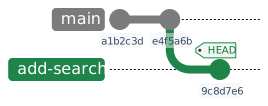
To see it for yourself, git log --oneline --decorate lists your commits newest first, each with its short SHA and the branch or HEAD labels that point at it.
History keeps what you commit
Back to the secret. Say the .env did land in a commit, before the .gitignore existed. Deleting the file now and committing the deletion does not remove it. The old commit still holds the full snapshot, .env and all, named by its SHA and reachable forever; anyone with the repo checks out that commit and reads the key. History is append-only: a new commit removes the file going forward, but it cannot reach back and edit a snapshot that is already frozen and named.
Undoing it costs more than keeping it out did. git rm --cached .env stops tracking the file from the next commit on, paired with the .gitignore so it stays out. To erase it from the past you rewrite history with a tool like git filter-repo, which changes the SHA of every commit from the bad one forward and disrupts anyone who already has a copy. And by the time you notice, the secret may have travelled, so the only honest move is to rotate it: treat a committed secret as already leaked. The cheap fix is the one at the top of this post, the .gitignore that kept it out of the snapshot to begin with.
The whole thing
The repo, set up once. The .gitignore at the root, before anything is staged:
node_modules/.env.env.**.logbuild/Then a deliberate first commit and a branch to work on:
git initgit add .gitignore src/ package.json package-lock.jsongit commit -m "initial project"git switch -c add-searchFrom a fresh project that gives you a repo tracking your source and nothing it can rebuild or must keep secret, a first commit you shaped, and a branch to work on while main stays steady. git status from here shows a clean tree, with the ignored files staying invisible.
What this costs
The staging area is a step people skip with git commit -am "...", which stages and commits every tracked file in one go. It is handy, and a small echo of the original trap: -a leaves untracked files alone, so new junk stays behind the .gitignore, but it sweeps every tracked change into one commit, which is how unrelated edits end up married in the history. Reach for it when the change is one thing.
.gitignore guards against the accidental add and nothing more. git add -f node_modules forces an ignored path in; the ignore is a guardrail you can step over when you choose to. And a pattern that is too broad, an *.log that swallows a log you wanted, hides the file without a word.
Branches are cheap to make and easy to lose track of. The detached-HEAD trap is one way; a branch left unmerged is another, work that exists only as a label you have to remember to come back to. The pointer is free; keeping it in mind is not.
And this is Git on one machine. The moment you push to a remote and pull other people’s work, a second copy of all this lives elsewhere, and the two have to be kept in step: pushing, fetching, merging, and the host you put it on, GitHub, Codeberg, a self-hosted Forgejo or GitLab. That is a piece of its own.
Your repo is not this repo
The shape here is a Node project, so node_modules and .env are the things to keep out. A Python repo ignores __pycache__/ and .venv/, a Rust repo target/, every stack its own generated and secret files. The model underneath does not change: a commit is a snapshot named by a hash, the staging area is the draft you shape it from, a branch is a pointer you move for free, and history keeps whatever you hand it. Read your .gitignore as the list of things the snapshot should never see.
What you end up with
A repo that holds your source and nothing it can regenerate or must keep secret, commits you shaped on purpose through the staging area, branches you make without a second thought, and a clear view that history keeps what you commit, so the cheapest secret is the one that never goes in. Nothing here is advanced. It is the floor the rest stands on: rebases, bisects, the pre-commit hook that formats your code (here), all of it assumes a commit is a snapshot and a branch is a pointer.
Further reading
The model, and the templates to start from:
- Pro Git is the free, canonical book; its “Git Basics” and “Git Branching” chapters cover everything here and the plumbing under it in more depth.
github/gitignoreis a collection of ready-made.gitignoretemplates, one per language and framework, worth starting from instead of writing your own.- Julia Evans’ How Git Works is the friendly version of the mental model, written for people who have used Git for years and still find it scary.