Every file on a Linux system has an owner and a group, and a short list of who may read it, change it, or run it. Every process runs as a user too. When the user a process runs as is not on the list for a file it reaches for, the kernel answers with one thing, Permission denied, and the service stops.
Here is where that bites. A service runs as a normal, non-root user. It needs a directory to write to, uploads, a database file, a cache. It starts, tries to write, and dies:
Error: EACCES: permission denied, open '/srv/app/data/db.sqlite'The fix everyone reaches for, the one at the top of every forum answer, makes the error go away in a line:
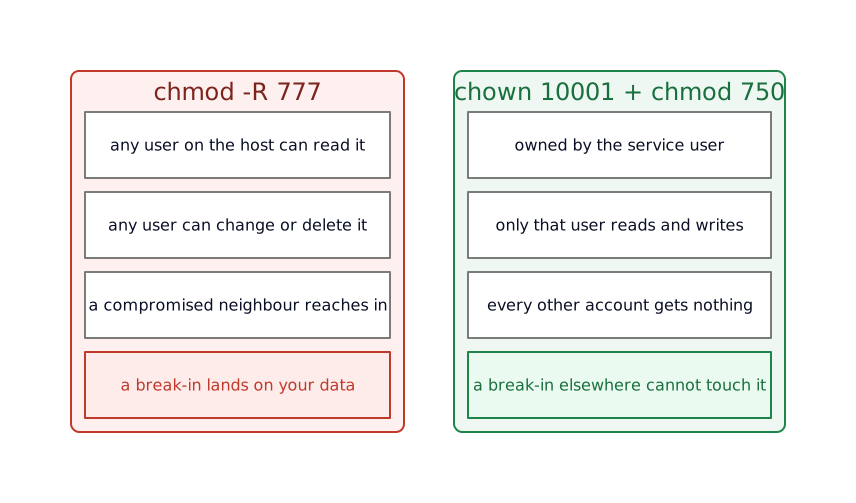
chmod -R 777 /srv/app/dataIt works. It also hands every other user on the machine, and every other process, read and write and delete over everything in that directory. 777 makes the symptom vanish and leaves the hole wide open. Each section below locks the same directory down one idea at a time; the finished recipe is at the end.
Ownership: who the file belongs to
ls -l shows the owner and group of everything in a directory:
$ ls -ld /srv/app/datadrwxr-xr-x 2 root root 4096 Jun 14 10:00 /srv/app/datals -l prints one line per file; -d makes it describe the directory itself instead of its contents. The two roots are the owner and the owning group. The service does not run as root, it runs as user 10001, and 10001 is neither the owner nor in the owning group. So it falls into the third class, everyone else, where the r-x grants no write. Hence EACCES.
The first real move is to give the directory to the user that runs the service:
chown 10001:10001 /srv/app/datachown OWNER:GROUP sets both at once. The number is the point. On Linux a user is a number, the UID, and a name like app is a label that /etc/passwd hangs on that number for humans to read. The kernel checks the number. 10001 may have no name at all, which is normal inside a container, where the hardened image invents a user with that exact id and no entry on the host. chown 10001:10001 works whether or not a named account exists, because the number is the identity.
Read, write, execute, and the three classes
That drwxr-xr-x from ls is the permission set. Drop the leading d, which marks a directory, and nine letters remain, in three groups of three:
rwx r-x r-xowner group otherEach group carries the same three permissions: read, write, execute. On a file they mean read its contents, change them, run it. On a directory they shift: read lists the names inside, write creates and deletes entries, and execute lets you enter the directory and reach what is in it by name. A directory you can execute but not read is one you can pass through to a known path but cannot list.
Each group of three is also a digit. Read, write and execute are three switches, each worth a value, 4, 2 and 1. Add up the ones that are on, and the three letters collapse to a single number.
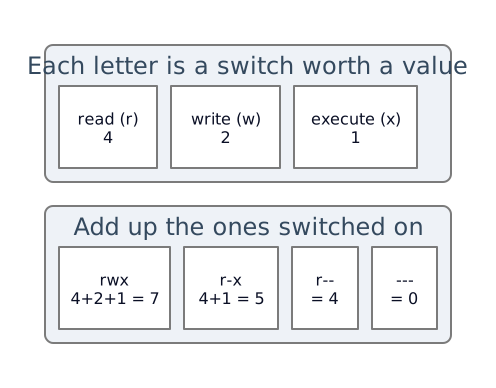
So 755 is rwxr-xr-x, and 777 is rwxrwxrwx, every permission to everyone. That is what the forum answer turned on.
The directory needs the owner to do everything and no one else to do anything:
chmod 750 /srv/app/data750 is rwx for the owner, r-x for the group, nothing for other. The service, now the owner, reads and writes. The rest of the machine is shut out. If another process needs in later, a backup job, a log shipper, you add it to the group and use the group’s bits, instead of opening the directory to the whole world to reach one account.
setgid: one group, held together
Say two identities share the directory: the service writes the data, and a backup account reads it back out. Put both in a group, appdata, and widen the group’s bits from the r-x of 750 to rwx so both can write:
groupadd appdatachown 10001:appdata /srv/app/datachmod 770 /srv/app/dataOne problem remains. When the service creates a file, the file’s group is the service user’s default group, its primary group, not appdata. The backup account, in appdata but not in the service’s group, cannot touch the new files. The directory is shared; the files inside drift out of the group meant to reach them.
The setgid bit on the directory closes the drift. With it set, every new file and subdirectory inherits the directory’s group instead of the creator’s:
chmod 2770 /srv/app/dataThe leading 2 is the setgid bit. It rides in a fourth digit, in front of the three you know, and that digit holds the three special bits: setuid is 4, setgid is 2, sticky is 1. 2770 is setgid plus rwxrwx---. Now a file the service writes lands in appdata, and the backup account reads it. ls shows the bit as an s where the group’s x would be: rwxrws---.
The sticky bit, and why /tmp is 1777
The opposite situation: a directory many users write to at once, where each should manage their own files and leave the others alone. Here a surprise in how deletion works bites. Removing a file is an operation on the directory that holds it, not on the file. So write permission on a directory lets you delete any file in it, including files you do not own and cannot read.
The sticky bit shuts that down. Set on a directory, it limits deleting and renaming a file to the file’s owner, plus the directory’s owner and root. The classic case is /tmp, the scratch directory every user can write to:
$ ls -ld /tmpdrwxrwxrwt 10 root root 4096 Jun 14 10:00 /tmpThat trailing t is the sticky bit, and the mode is 1777: world-writable, 777, with the sticky bit as the leading 1. Any user drops files in /tmp; no user deletes another’s. A locked-down container recreates exactly this. The hardened compose file mounts a fresh /tmp at mode=1777, and a build that once shipped /tmp without that mode is the whole of a postmortem on this blog: a single missing bit that kept nginx from starting.
setuid: the bit you strip
The last special bit is the one most worth knowing on sight, because you set it almost never and an attacker is glad to find it. setuid on an executable makes it run as the file’s owner, whoever launches it. The standard example is passwd: an ordinary user runs it to change their own password, and it edits /etc/shadow, a root-owned file, because the binary is setuid-root and so runs as root for the moment it executes.
$ ls -l /usr/bin/passwd-rwsr-xr-x 1 root root 59976 ... /usr/bin/passwdThe s where the owner’s x would be is setuid. Useful for passwd, a liability everywhere it is not needed: a setuid-root binary with a bug is a direct path from a normal user to root, and an attacker who lands in a container goes looking for one. This is why the hardened image runs find / -perm /6000 -exec chmod a-s near the end of its build, stripping the setuid and setgid bits (6000 is both) off every file that carries one. To see what carries the bit on a machine:
find / -perm -4000 -type f 2>/dev/nullfind -perm -4000 matches files with the setuid bit set, -type f keeps it to files, and 2>/dev/null throws away the permission-denied noise from directories you cannot read. The point is to recognize it: you read rws in a listing and ask why that binary needs to run as its owner.
The whole recipe
The directory, set up once, for a service running as user 10001 with a backup account sharing the appdata group:
# the group the service and the backup account sharegroupadd appdata
# own it by the service user and the shared groupchown 10001:appdata /srv/app/data
# setgid so new files inherit the group; rwx for owner and group, nothing for the restchmod 2770 /srv/app/dataThree lines, and each is a decision: who owns it, who shares it, and that no one else gets in. Where a directory is a free-for-all by design, a shared scratch space, the sticky bit (chmod 1777) lets everyone write while keeping each user’s files their own. Where a binary has to run as its owner, the setuid bit is there on purpose, and on a hardened image every other one is stripped.
What this costs
chmod -R is a blunt instrument. Point it at a tree and it sets the same bits on directories and files alike, so a recursive 750 hands every data file an execute bit it has no use for, and a recursive 770 can leave plain files marked executable. When you do need to descend a tree, split the two: find /srv/app/data -type d -exec chmod 750 {} + for directories and -type f -exec chmod 640 {} + for files, or lean on chmod’s capital X, which adds execute only to directories and to files that already have it.
Permissions are one machine’s model, and they do not always survive a move. A Docker bind mount, a host directory mapped straight into a container, carries the host’s numeric ownership with it, so a directory owned by 10001 on the host is owned by whatever account holds 10001 inside the container, named or not, and the two rarely agree on a name. A file copied to a different filesystem, an NFS export, an SMB share, lands under that system’s own rules. The number travels; the meaning around it does not.
And the three-class model is a floor. One owner, one group, everyone else covers most needs and runs out the moment two groups need different access to the same file. That is what access control lists are for, setfacl and getfacl, a per-user, per-group overlay on top of these bits. Reach for them when the three classes cannot express what you need, and not before, because an ACL is easy to set and easy to forget you set.
Your service is not this service
The artifact is a data directory for a non-root service, because that is where these rules bite first and hardest. The model underneath holds for a config file only one account should read, a socket two services share, a home directory. Each time the questions are the same: who owns this, who else has a real need, and what does the rest of the system get, which is nothing until you say otherwise. The commands assume one machine; a shared network filesystem or a container bind mount keeps the model and adds its own mapping on top.
What you end up with
A directory the service uses and nothing else on the box can open, in place of a 777 that worked and leaked. Ownership by number, the three classes and their octal shorthand, and the four special bits: setgid to hold a shared group together, sticky to let a crowd share a directory without stepping on each other, setuid read on sight and stripped from images that have no use for it. The bit you set least is the one most worth reading.
This is the half of the basics the container posts lean on without stopping to explain, the 10001, the 1777, the setuid strip. The other half is what a process is, how it starts and stops, and who has to be PID 1. That one stands on its own.
Further reading
The bits, and the tools around them:
- The chmod manual page is the reference for every mode in this post, octal and symbolic, including how to set the special bits by letter (
u+s,g+s,+t). - The Arch Wiki’s File permissions and attributes covers the wider picture:
umaskfor the defaults new files get, access control lists, and the file attributeschattrsets underneath all of this. - Julia Evans’ permissions comic is the one-page version of everything above, for when it has not clicked yet.