A process is a running program. It has a number, the PID, that the kernel hands out when it starts; a parent, the process that started it; and an exit status, a small number it leaves behind when it ends. Every command you run is a process, and most come and go without you thinking about any of that.
It starts to matter when a process runs for a long time and you need to stop it. Take a script that re-encodes a pile of video files to save space, an hour of work, one file at a time:
#!/bin/shfor f in "$@"; do echo "encoding $f" ffmpeg -i "$f" "$f.small.mp4"doneffmpeg does the slow part; the loop walks the files you passed on the command line. Halfway through you change your mind and press Ctrl-C. The script stops, and it leaves a mess behind: a half-written .small.mp4 for the file it was on, and no record of how far it got. Stopping a long job well is its own skill, and it runs on signals.
Signals: how you ask a process to stop
A signal is a one-word message the kernel delivers to a process. Ctrl-C sends SIGINT, interrupt. The kill command sends SIGTERM, terminate, the same one the system sends every process on shutdown. Both mean “please stop,” and a process can install a handler to catch either and shut down on its own terms first. The one it cannot catch is SIGKILL, the signal behind kill -9: the kernel removes the process on the spot, mid-write if it has to, with no chance to clean up. You reach for it when a process is stuck and deaf to everything else, and you pay for it with whatever it left half-done.
kill oversells its name. kill 4321 sends SIGTERM to process 4321, a request. kill -9 4321 is the one that does not ask.
Those three stop a process. The kernel defines a few dozen signals in all, and a handful beyond the stop-the-job set turn up often: SIGHUP when a terminal closes, which long-running programs catch and treat as “reload your config”; SIGTSTP from Ctrl-Z and SIGCONT to suspend a job and resume it; SIGUSR1 and SIGUSR2, which mean whatever the program decides; and SIGCHLD, which the kernel sends a parent when one of its children exits, the nudge behind reaping. Each has a default action and a note on whether a handler can catch it.
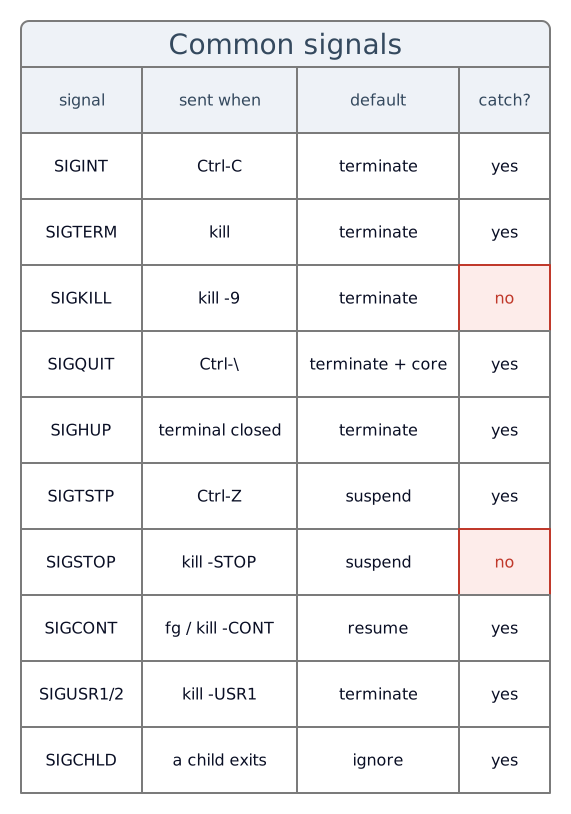
SIGKILL and SIGSTOP are the two no program can catch; the kernel acts on them itself. Every other row is a request a handler can answer.
Catch the signal, stop on a clean line
By default SIGINT and SIGTERM end the process where it stands. A trap swaps that default for a handler of yours. The shell post uses a trap to delete a temp file on the way out (here); this is the other job a trap does, catching a stop signal so the loop ends on a boundary instead of mid-file.
#!/bin/shstop=0trap 'stop=1' INT TERM
for f in "$@"; do [ "$stop" = 1 ] && break echo "encoding $f" ffmpeg -i "$f" "$f.small.mp4" || rm -f "$f.small.mp4"donetrap 'stop=1' INT TERM says: when SIGINT or SIGTERM arrives, set stop to 1 rather than die. The shell now survives the Ctrl-C that would have killed it, so the work after it runs. The interrupted ffmpeg exits non-zero, || rm -f clears its half-written output, and the loop checks stop at the top and breaks instead of barreling into the next file. One press, and the job winds down at a point you chose.
The child that keeps going
A terminal’s Ctrl-C is the special case: it sends SIGINT to every process in the foreground at once, the script and its ffmpeg together. Nothing else is so generous. Send SIGTERM to the script by its PID, the way a service manager or another script stops it, and it reaches the script and stops there; the ffmpeg keeps encoding. Put that child in the background and even the terminal’s Ctrl-C passes it by. So to stop the child on any signal, you forward it yourself.
To stay in control, run the slow child in the background and keep its PID, so you can pass the signal along:
#!/bin/shchild=stop=0
term() { [ -n "$child" ] && kill -TERM "$child" 2>/dev/null stop=1}trap term INT TERM
for f in "$@"; do [ "$stop" = 1 ] && break echo "encoding $f" ffmpeg -i "$f" "$f.small.mp4" & child=$! wait "$child" || rm -f "$f.small.mp4"doneffmpeg ... & starts it in the background; $! is the PID it was given, saved in child. wait "$child" parks the script until that one encode finishes, so the loop still runs one file at a time. A SIGTERM to the script now runs term: the [ -n "$child" ] guard makes sure a child is running, kill -TERM "$child" forwards the signal to the ffmpeg in flight, and 2>/dev/null discards the error if that process has already exited. The handler raises the stop flag too, so the child comes down with the parent and the loop ends at the top.
Orphans, zombies, and where they go
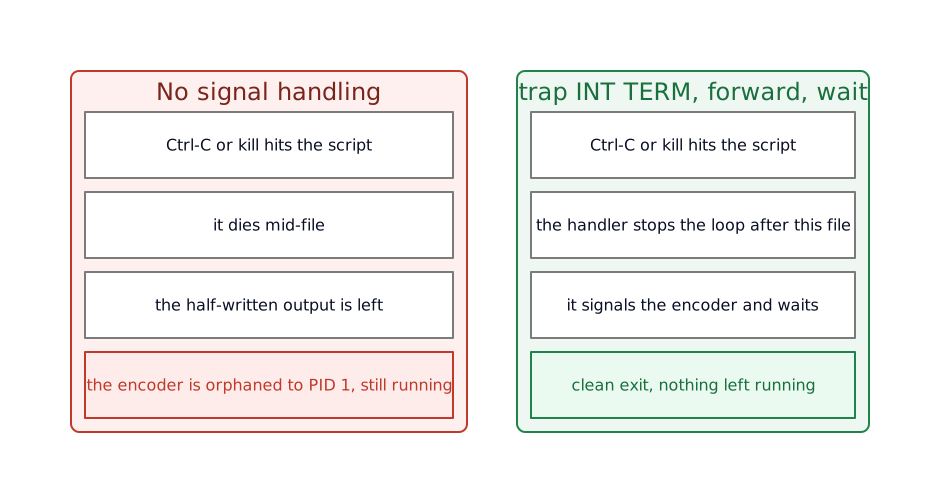
Skip the forwarding and the running ffmpeg does not stop when the script does, it gets cut loose. When a process’s parent exits first, the child does not exit with it. The kernel hands the orphan to process number one, PID 1, and it keeps running, now with nothing watching it. That is the encode still pinning a CPU core an hour after you thought you had killed the job.
PID 1 is the first process the kernel starts at boot, the init, and every other process descends from it. On a normal machine ps -p 1 -o comm= names it, systemd on most Linux today. It carries a standing duty: when an orphaned child finally exits it becomes a zombie, a stub holding its exit status until someone reads it with a call named wait, and PID 1 is what reaps those leftovers so they do not fill the process table.
Run a process as PID 1 yourself and that duty becomes yours, signal forwarding and zombie reaping both. That is the job an init takes on inside a hardened container image.
When the script is only a launcher
Sometimes a wrapper script does nothing but set a few variables and start one long program. There is no loop to guard and no second child to mind, and the shell in the middle only stands in the signal’s way. exec takes it out:
#!/bin/shexport FFREPORT=file=encode.logexec ffmpeg -i "$1" "$1.small.mp4"exec replaces the shell with ffmpeg, in place, keeping the same PID. The shell is gone, and signals reach ffmpeg with nothing in between that has to forward them. When a script’s whole purpose is to launch one program, end it with exec and the program inherits the script’s place.
The whole thing
The encoder, at encode.sh:
#!/bin/sh# re-encode a list of files; stop on a clean boundary and take the encoder down toochild=stop=0
term() { [ -n "$child" ] && kill -TERM "$child" 2>/dev/null stop=1}trap term INT TERM
for f in "$@"; do [ "$stop" = 1 ] && break echo "encoding $f" ffmpeg -i "$f" "$f.small.mp4" & child=$! wait "$child" || rm -f "$f.small.mp4"doneRun it as encode.sh *.mov. It encodes one file at a time, and a Ctrl-C or a SIGTERM stops the current encode, clears its partial output, and ends the loop at the top, with no ffmpeg left running behind it.
What this costs
A handler that sets a flag only stops between units of work. A single very long unit still has to be cut off in the middle, and you clean up that one file’s mess yourself, which is what the || rm -f is for. The finer the boundary, the sooner the job stops and the more bookkeeping you carry.
Running each child in the background and waiting on it keeps you in control, and it turns a one-line ffmpeg call into four, with the child’s PID and its cleanup now yours to track. For a script with no loop and one child, that is wasted effort, and exec is the lighter answer.
SIGKILL ends all of this. Nothing you trap survives kill -9, so a job that has to leave clean state must do it while handling SIGTERM, before someone loses patience and sends the one you cannot catch.
And wait and $! only track the children you started by hand. A child that forks its own children, or a process tree several levels deep, outgrows a shell script, and the work belongs to a real supervisor: a service manager like systemd, or an init built for the job.
Your job is not this job
The artifact is a batch encoder, because a long job with a heavy child makes every one of these show: a signal you want to catch, a child you have to bring down with you, an orphan you do not want to leave behind. A backup that runs for an hour, a data import, a dev server you start and stop a hundred times a day: the same parts. Ask the same three questions. What should a stop signal do here, which children have to hear about it, and who inherits whatever you leave running.
What you end up with
A long job you can stop on purpose: one Ctrl-C and it winds down at a boundary you chose, clears the file it was on, and takes its child with it, in place of dying mid-write and leaving an encode pinning a core. A trap turns the default “drop dead” into a handler of your own. wait and $! keep a child in reach. exec steps the shell out of the way when it has nothing left to do. And the orphans you never leave behind are the ones PID 1 never has to inherit.
A process, the user it runs as, the files it may touch, and the way it starts and stops: those are the basics the rest of these posts lean on and do not pause to explain.
Further reading
The signals, and the init duty in full:
signal(7)lists every signal and its default action, the table behind “SIGTERM terminates, SIGKILL cannot be caught.”- Julia Evans’ signals comic is the one-page tour of SIGINT, SIGTERM, SIGKILL and the rest.
- Phusion’s PID 1 and the zombie reaping problem is the deep version of the last sections: what happens when your process is the one at PID 1 inheriting the orphans.