A shell is the program that reads the commands you type and runs them. Bash is one of them, the default on most Linux machines. Save a sequence of commands in a file and run it, and that file is a program written in the shell’s own language. The language has sharp defaults, and the sharpest is this: a script that hits an error partway through runs the next line anyway, on top of whatever half-finished state the failed line left behind.
Here is a script that backs up a directory to a compressed archive. It runs. On my machine, today, it does what it says.
#!/usr/bin/env bashsrc=$1dest=$2tar -czf $dest/backup-$(date +%F).tar.gz $srcThe first line is the shebang, the marker that tells the system which interpreter to run the file with; /usr/bin/env bash finds Bash on your PATH. tar bundles the folder at $src into one file and -z compresses it with gzip. $1 and $2 are the first two arguments the script was called with, so backup.sh ~/photos /mnt/backups sets src to ~/photos and dest to /mnt/backups. $(date +%F) runs date, asks it for the ISO date (2026-06-14), and drops the result into the filename. Four lines, and every one of them has a way to ruin the backup it is meant to make. Each section below turns off one of those defaults on the same script; the finished file is at the end.
Quote everything you expand
$src and $dest look like the values you passed in. They are, until one of them contains a space. Before the shell runs tar, it expands every $variable on the line and then splits the result on whitespace into separate arguments. tar -czf $dest/... $src with src set to My Photos does not pass one argument My Photos; it passes two, My and Photos, and tar looks for a folder called My and another called Photos, neither of which exists. The same expansion turns a * in the value into a glob, so a wildcard in an unvetted path, read from a config file, expands into a list of filenames the script never meant to touch.
Wrapping the expansion in double quotes turns the splitting off. "$src" is one argument, spaces and all, with no globbing.
src=$1dest=$2archive="$dest/backup-$(date +%F).tar.gz"tar -czf "$archive" -- "$src"Two changes. Every use of a variable is quoted. And -- sits between tar’s options and the path. -- marks the end of the options, so a folder named -c or a path that starts with a dash lands as a path and not as a flag tar tries to read. Assigning src=$1 needs no quotes, because the right side of an assignment is one value and the shell does not split it there; the risk is at the point of use, where the value becomes part of a command line.
Every command returns a verdict
Each command a shell runs ends with an exit code: a number from 0 to 255 that records how it went. Zero means success. Anything else is a kind of failure, and the convention is loose enough that a program picks its own meanings (grep returns 1 when it found no match, 2 on a real error). The shell keeps the last one in $?.
tar -czf "$archive" -- "$src"echo "$?" # 0 if the archive was written, non-zero if tar gave upThat number is the one thing standing between a backup that worked and one that did not, and it is easy to throw away. Pipes throw it away by default. A backup is worth a sanity check before it runs, say a count of the files about to go in:
count="$(find "$src" -type f | wc -l)"echo "backing up $count files"find walks $src and prints every file; wc -l counts the lines. The pipe sends find’s output into wc, and $(...) captures what comes out the end. Here is the trap: the exit code of a pipeline is the exit code of its last command, wc. If $src does not exist, find fails and prints nothing, wc counts zero lines and exits 0, and the pipeline reports success. count is 0, and the script goes on to build an empty archive over a path that was never there.
set -euo pipefail
Three of Bash’s defaults are wrong for a script you want to trust, and one line flips all three. Put it right under the shebang:
#!/usr/bin/env bashset -euo pipefailset changes shell options for the rest of the script. The three here:
-eexits the moment any command returns non-zero, instead of running the next line on top of the failure. The run that built half an archive stops there.-utreats an unset variable as an error. Call the script with one argument and$2is empty; without-u,destis the empty string and the archive is written to/backup-...at the root of the disk. With-u, the script stops on the unbound$2before it can.-o pipefailchanges a pipeline’s exit code to that of the first command that failed, not the last. Now the failedfindfrom the previous section fails the whole line, and-eacts on it.
The shebang says bash and not sh on purpose. pipefail is a Bash feature (also in zsh and ksh), absent from the POSIX shell that #!/bin/sh may point at. A pre-commit hook I keep portable uses set -e alone for that reason (here is that hook); a script that leans on pipefail has to declare the shell that carries it.
Clean up on the way out
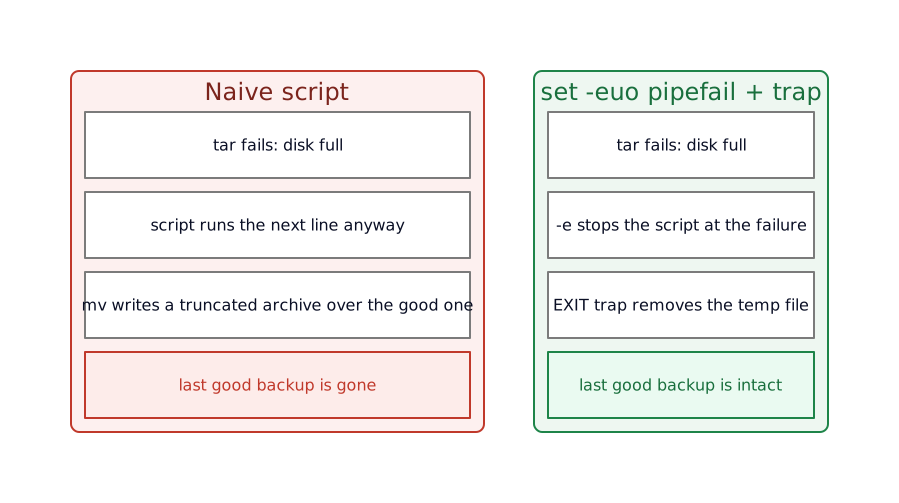
set -e stops the script on the first failure, which raises a new question: what about the mess the failed run left behind? The backup writes a .tar.gz; if tar dies halfway, a truncated archive is sitting where the good one was.
The fix is to never write over the good backup until the new one is whole. Build it under a temporary name, and move it into place once tar has finished. mktemp makes a temporary file with a random, unused name and prints the path:
tmp="$(mktemp "$dest/.backup-XXXXXX")"tar -czf "$tmp" -- "$src"mv -- "$tmp" "$archive"The XXXXXX is where mktemp writes random characters, so two runs never collide. The template lives in $dest, not the default /tmp, for a reason that matters: mv between two paths on the same filesystem is a rename, which is atomic. No reader of $dest watches a half-written file appear and slowly fill; the archive is absent one instant and complete the next. Put the temp in /tmp and mv may copy across filesystems, byte by byte, and the atomic guarantee is gone.
One hole remains. If tar fails, -e exits the script and the temp file stays on disk, a little pile of .backup-XXXXXX files growing with every failed run. A trap closes it.
tmp="$(mktemp "$dest/.backup-XXXXXX")"trap 'rm -f "$tmp"' EXITtrap 'echo "backup failed at line $LINENO" >&2' ERRtrap COMMAND CONDITION tells Bash to run COMMAND when CONDITION happens. EXIT is not a real signal; it is the shell’s own name for “whenever this script ends”, success or failure, clean exit or -e bailing out. So rm -f "$tmp" runs no matter how the script leaves: on success the temp was already renamed by mv and rm -f finds nothing to do, on failure it sweeps the leftover away. The second trap fires on ERR, the same condition -e acts on, and prints which line gave out. $LINENO is the current line number, and >&2 sends the message to standard error, the stream meant for diagnostics, so it stays clear of any real output the script prints.
The whole file
The fragments above, assembled, at backup.sh:
#!/usr/bin/env bash# back up a directory to a timestamped, compressed archive, atomicallyset -euo pipefail
src=$1dest=$2archive="$dest/backup-$(date +%F).tar.gz"
# build under a temp name in the destination so the final move is an atomic renametmp="$(mktemp "$dest/.backup-XXXXXX")"trap 'rm -f "$tmp"' EXITtrap 'echo "backup failed at line $LINENO" >&2' ERR
count="$(find "$src" -type f | wc -l)"echo "backing up $count files from $src"
tar -czf "$tmp" -- "$src"mv -- "$tmp" "$archive"Run it as backup.sh ~/photos /mnt/backups. It prints the file count, writes the archive under a hidden temporary name, and renames it into place once tar succeeds. Anything that goes wrong stops the run, names the line, and clears the temp on the way out.
What this costs
set -e is a sharp tool with corners worth knowing before you trust it. It stays quiet inside a condition: a command in an if, a while, or to the left of && or || can fail without stopping the script, because there its non-zero code is a result the script reads and the shell does not count it as an error. That is the behavior you want, and it is also how a real failure slips past when you did not mean to test for it. A command you allow to fail has to say so out loud with || true, or -e takes it down with everything else. set -e has enough such corners that it carries its own long FAQ entry; read it once before you lean on the flag.
-u bites the moment you have an optional argument. "$3" for a flag the caller may omit is an error under -u, so an optional value needs a default written into the expansion, "${3:-}" for empty or "${3:-daily}" for a fallback. The same syntax turns a missing required argument into a real message instead of unbound variable: write src="${1:?usage: backup SRC DEST}" and a forgotten path stops the script with a line you can read.
And this is Bash, not the POSIX shell. The script will fall over under a plain /bin/sh on a system where that is dash or BusyBox ash, because pipefail and some of the rest are Bash extensions. The shebang is the contract; keep to it, and do not paste these lines into a file that claims #!/bin/sh.
Your script is not this script
The artifact is a backup, because a backup makes every one of these defaults bite: a path with a space, an exit code worth checking, a half-written file that must never replace a good one. The script is the example. The habits are the point. Quote every expansion. Turn on set -euo pipefail at the top of anything longer than a throwaway. Build into a temporary and move it into place when you cannot afford a half-finished result. Clean up in a trap so any exit path leaves the disk the way you would want to find it. A deploy script, a migration, a nightly report: different commands, the same four moves.
What you end up with
The same four lines turned into a script that fails the way you want it to: with a message, at the first error, and without taking the last good backup down with it. Run it with a missing argument and it stops on the unbound variable. Pull the disk mid-run and it leaves a stray temp file the next run’s trap clears, and the previous archive untouched. Nothing it does is clever. It is the boring version, the one that holds up at 3 a.m. when the disk you back up to filled an hour ago.
This is the floor the other scripts on this blog stand on. The pre-commit hook, the CI steps, the deploy: each is a few lines of shell with the same defaults turned off at the top, because the shell underneath does not catch a missing quote or an ignored exit code on its own.
Further reading
This article trains your eye. A few resources go past where it stops, or hand the spotting to a tool.
- ShellCheck reads a script and flags most of what is above, the unquoted expansion and the ignored exit code, before you ever run it. Wire it into your editor and the warnings show as you type.
- “Use the Unofficial Bash Strict Mode” takes
set -euo pipefailone step further withIFS=$'\n\t', and walks the cases where strict mode bites back. - BashPitfalls and the BashGuide on Greg Wooledge’s wiki are the catalogue of the subtle ways a script breaks, and a guide that builds the language from the ground up.
- The GNU Bash manual is the reference for everything this skips: arrays,
getopts, parameter expansion, arithmetic, and signal handling pastEXITandERR.