Most Dockerfiles I inherit are one stage, run as root, and carry the whole toolchain that built them into production. They work. They are also bigger than they need to be, and a single bug in the running app hands an attacker a full Linux box, compiler and package manager included, as root.
This is the Dockerfile I reach for instead. The app is a server-rendered site: a Node process renders the pages, and nginx sits in front of it as a reverse proxy, forwarding requests to Node and caching the static responses. I ship both in one image, so a deploy is one thing to pull and run.
Three ideas shape the whole file. Build it in stages, so the shipped image carries no build tools. Run it as a user with no privileges. Strip out everything an attacker could use if they get in. The code here is Node and nginx on Alpine, the stack I had in front of me. The three ideas hold for any stack; the commands that carry them out change from one to the next. None of it is free, either.
Build in stages
A Docker image is a stack of layers, and by default everything you install during the build stays in the final image. Install a compiler to build the app, and the compiler ships to production along with it. A multi-stage build ends that: you build in throwaway stages and copy only the result into a clean final one.
# Three stages. Only the last one ships; the first two are scaffolding.FROM node:22-alpine AS deps # install dependencies (pinned by digest below)# ...FROM node:22-alpine AS build # build the app, then drop dev dependencies# ...FROM node:22-alpine AS runtime # the image you ship# ... the rest of this article fills in this stageThe first stage installs dependencies. The second copies them in, builds the app, and prunes the dependencies down to the ones production needs. The third starts from a fresh base and copies in the built output and those runtime dependencies, nothing else. The compiler, the source code, the test files, the dev tooling: none of it reaches the image you ship. The full versions of all three stages are at the end.

In numbers, the split earns its keep. The build stage here weighs 448 MB with the toolchain and dev dependencies inside it. The image I ship is 250 MB, and most of that is the Node base. The app and nginx add about 20 MB on top; everything else stayed behind in the stages I threw away.
When the build stage copies your project in, it grabs whatever sits in the folder, .git, .env, node_modules and all. A .dockerignore next to the Dockerfile keeps them out, and it matters for more than size. An .env baked into a layer is a leaked secret even when the layer belongs to a stage you throw away, because build caches get exported and shared.
Pin the base image to exact bytes
node:22-alpine looks specific. It is not. That tag moves: the maintainers keep pushing fixes to it, so the image you pull today differs from the one you pulled last month. Most days that helps you. Once in a while it is how a broken or tampered base slips into your build without a line of your own code changing.
A digest pins the exact bytes. It is a fingerprint of one specific image, computed from its contents, and it does not move.
ARG NODE_IMAGE=node:22.22.3-alpine3.24@sha256:9385cd9f3001dfc3431e8ead12c43e9e1f87cc1b9b5c6cfd0f73865d405b27c4FROM ${NODE_IMAGE} AS depsI keep the readable tag next to the digest so I can tell at a glance what it points at, and refresh it with docker buildx imagetools inspect node:22-alpine. The catch: a pinned digest also freezes the security patches that the moving tag would have brought you, so something has to bump it on a schedule. That something is CI, and it is a story for another day.
One more supply-chain line, back in the dependency stage: npm ci --ignore-scripts. An npm package can run code on your machine during install, through what npm calls lifecycle scripts, and that is a known way to smuggle in malware. --ignore-scripts turns it off. If your build needs one of those scripts, run that one on purpose, by name.
Run as a non-root user
By default a container runs as root. Root inside a container is not root on the host, but it sits one kernel bug or one careless mount away from it. Running the process as a plain user instead, what people call running rootless, is the single most valuable line in this whole file. Once the process is a normal user, an app bug stays an app bug: it cannot overwrite the files it runs from, and the climb to host root loses its first rung.
The user is one I invent in the Dockerfile. It does not have to match any account on the host or any user that ships in the base image. The identity the kernel cares about is a number, so I pick one: 10001, high enough to stay clear of the system ids the base image already uses.
RUN addgroup -S -g 10001 app \ && adduser -S -G app -u 10001 -h /app -s /sbin/nologin app
# ... copy files in, owned by that user ...COPY --from=build --chown=app:app /app/build ./build
USER 10001:10001USER 10001:10001 would work with no adduser line at all: the kernel runs the process under that number whether or not a named account exists, and privilege comes from the number being non-zero, not from any user database. I create the account anyway for three comforts: a home directory, a /sbin/nologin shell, and a name the app can find when it looks itself up. The --chown hands the copied files to that user; the USER line makes every process run as 10001, never root.
A non-root process comes with one limit worth planning for: it cannot bind to ports below 1024, the range the system reserves for root. That is why nginx listens on 8080 rather than 80 further down the file. The proxy or platform in front maps the public port onto it.
Leave an attacker nothing to work with
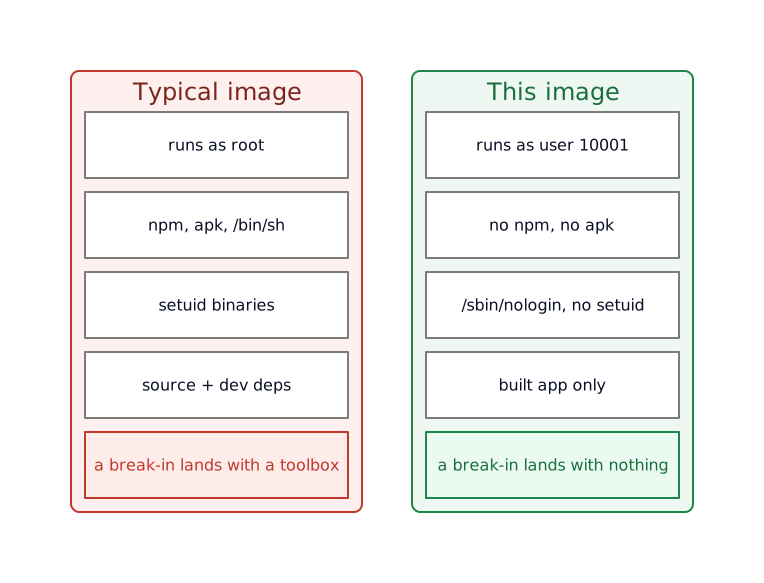
Say someone does find a way to run commands inside the container. The next thing they reach for is tooling: a package manager to install something, an interpreter to fetch a payload, a setuid binary to climb back up to root. A production image needs none of it, so I delete it during the build.
RUN apk upgrade --no-cache \ && apk add --no-cache nginx tini \ && rm -rf /usr/local/lib/node_modules/npm \ /usr/local/bin/npm /usr/local/bin/npx /usr/local/bin/corepack \ /sbin/apk /etc/apk /lib/apk /usr/share/apk /var/lib/apk \ && find / -xdev -type f -perm /6000 -exec chmod a-s {} + 2>/dev/null || trueapk upgrade applies the latest OS security patches at build time. It also ties the exact package versions to the day you build, which chips at the byte-for-byte reproducibility the pinned digest gave you. It is the same trade as the base image: pin the source you trust, take fresh patches on top. After installing nginx and tini, I remove npm, npx and corepack, which are Node’s package managers, and then apk, which is Alpine’s. An attacker in this container cannot install anything, because the tools to install with are gone. The find line strips the setuid bit, a flag that lets a program run with its owner’s privileges no matter who starts it, from every file that carries one. That closes a well-worn path back to root.
I also set NODE_OPTIONS=--disable-proto=delete on the runtime stage. It closes one prototype-pollution vector, the __proto__ accessor. That is a small hardening, not a cure, since pollution through other paths still works, but it costs nothing to turn on.
One container, two processes
Running nginx and Node together raises a question a one-process container never has to ask: which one is process number one?
The first process in a container, PID 1, carries two duties most programs never expect. It has to forward shutdown signals to its children, and it has to clean up finished background processes before they pile up as zombies. Node or nginx as PID 1 does neither. The symptom you notice is docker stop taking ten seconds every single time, because the shutdown signal goes ignored until Docker loses patience and kills the container outright.
tini is a tiny init program built for this. It runs as PID 1 and hands off to a small script of mine, entrypoint.sh, that starts both services and ties their fates together:
#!/bin/sh# /usr/local/bin/entrypoint.sh: starts nginx and Node, exits if either one diesset -eu
node /app/build/index.js &NODE_PID=$!
nginx -g 'daemon off;' &NGINX_PID=$!
# If either process exits, stop the other and let the container die,# so the platform restarts a clean one.wait -nkill -TERM "$NODE_PID" "$NGINX_PID" 2>/dev/null || trueThe Dockerfile copies that script to /usr/local/bin/entrypoint.sh and points the entrypoint at it, with tini in front:
COPY --chmod=0755 entrypoint.sh /usr/local/bin/entrypoint.shENTRYPOINT ["/sbin/tini", "-g", "--", "/usr/local/bin/entrypoint.sh"]tini -g forwards signals to the whole process group, so a docker stop reaches both nginx and Node at once. wait -n returns the moment either one exits, and the container goes down with it. A half-dead container, where nginx is up but Node has crashed, never lingers: it exits, and the platform starts a fresh one.

Make a bad config fail the build
One line in the runtime stage earns its place:
RUN nginx -t -c /etc/nginx/nginx.confnginx -t checks the config for errors at build time, so a typo fails the build instead of crashing the container on its first boot in production.
While nginx is in front of you, one trap worth knowing, because it fails without a word. nginx does not combine add_header directives the way you would guess. The moment a location block sets its own add_header, it drops every header it would have inherited from the server above it. Set your security headers once at the top, add a single caching header inside one location, and that location loses all the security headers and says nothing. The fix is to put the headers in their own file and include it inside every location that needs them.
Tell the platform when it is healthy
HEALTHCHECK --interval=30s --timeout=5s --start-period=20s --retries=3 \ CMD wget -qO- http://127.0.0.1:8080/healthz >/dev/null 2>&1 || exit 1
STOPSIGNAL SIGTERMThe HEALTHCHECK gives the container a way to report its own state. It asks nginx for a small /healthz page every 30 seconds, and a container that fails enough checks in a row gets restarted instead of serving errors.
The trailing z on /healthz is a convention, not a typo. Google started suffixing its internal status endpoints with a z so the names would not collide with real application routes, and Kubernetes carried the habit into the wider world. A path called /health might become a real page one day; /healthz almost never will. nginx answers it directly, so the check passes as long as nginx is up, with no round trip to Node.
STOPSIGNAL SIGTERM, with tini underneath, keeps docker stop quick and clean.
The whole file
The fragments above, assembled. The # syntax line at the top turns on the BuildKit features this file uses, like COPY --chmod, so it needs a recent Docker.
ARG NODE_IMAGE=node:22.22.3-alpine3.24@sha256:9385cd9f3001dfc3431e8ead12c43e9e1f87cc1b9b5c6cfd0f73865d405b27c4
# Stage 1: install dependenciesFROM ${NODE_IMAGE} AS depsWORKDIR /appCOPY package.json package-lock.json ./RUN npm ci --ignore-scripts
# Stage 2: build the app, then drop dev-only dependenciesFROM ${NODE_IMAGE} AS buildWORKDIR /appCOPY --from=deps /app/node_modules ./node_modulesCOPY . .RUN npm run build && npm prune --omit=dev
# Stage 3: the image you shipFROM ${NODE_IMAGE} AS runtimeENV NODE_ENV=production \ HOST=127.0.0.1 \ PORT=3000 \ NODE_OPTIONS=--disable-proto=delete
# OS patches, add nginx + tini, create a non-root user,# then remove every package manager and strip setuid bits.RUN apk upgrade --no-cache \ && apk add --no-cache nginx tini \ && addgroup -S -g 10001 app \ && adduser -S -G app -u 10001 -h /app -s /sbin/nologin app \ && rm -rf /usr/local/lib/node_modules/npm \ /usr/local/bin/npm /usr/local/bin/npx /usr/local/bin/corepack \ /sbin/apk /etc/apk /lib/apk /usr/share/apk /var/lib/apk \ && find / -xdev -type f -perm /6000 -exec chmod a-s {} + 2>/dev/null || true
WORKDIR /appCOPY --from=build --chown=app:app /app/build ./buildCOPY --from=build --chown=app:app /app/node_modules ./node_modulesCOPY --from=build --chown=app:app /app/package.json ./package.jsonCOPY nginx.conf /etc/nginx/nginx.confCOPY --chmod=0755 entrypoint.sh /usr/local/bin/entrypoint.sh
RUN nginx -t -c /etc/nginx/nginx.conf
USER 10001:10001EXPOSE 8080
HEALTHCHECK --interval=30s --timeout=5s --start-period=20s --retries=3 \ CMD wget -qO- http://127.0.0.1:8080/healthz >/dev/null 2>&1 || exit 1
STOPSIGNAL SIGTERMENTRYPOINT ["/sbin/tini", "-g", "--", "/usr/local/bin/entrypoint.sh"]It leans on two files I do not print in full here: an nginx.conf that points nginx’s pid and temp paths at /tmp so it can run as a non-root user, and a compose file that mounts /tmp and freezes the rest of the filesystem. On its own the Dockerfile builds; it expects those two when it runs.
What this costs
None of this is free, and a few of the choices cut against common advice.
Two processes in one container goes against the one-process-per-container grain, and that grain is real. You give up scaling nginx on its own, a crash in either service takes the whole container down, and you take on the init duties that a single-process container hands to Docker. Those costs bite at scale, where you want to scale, restart and watch each piece on its own.
At the size of this project they barely register: there is nothing to scale nginx against, the app and its proxy live and die together either way, and the payoff is one image to deploy. The heterodoxy will not hurt a small setup as long as the init is done right, tini as PID 1 and the container exiting the moment either process dies. For a larger system I would split nginx out, or proxy at the edge and drop nginx from the image.
A pinned digest rots when nothing bumps it. Freeze the base and walk away, and a few months later you are serving known holes behind a lock that looks shut. The pin and the scheduled rebuild are one practice, not two. Pinning without the rebuild ends up worse than the moving tag it replaced, because it hides its own age.
Deleting the package manager and the shell costs you the container as a place to debug. You cannot add a tool when production acts up. You read logs, copy files out, or boot a fatter image built for that purpose. It is the deal you signed: a smaller surface for an attacker, a harder one for you.
Two narrow traps sit lower down. npm ci --ignore-scripts breaks any dependency that compiles or downloads a binary during install, and Alpine’s musl C library trips native modules that expect glibc. Both have fixes, allow the one script, rebuild the module, or move that image off Alpine. You tend to meet them the first time a build that worked everywhere else falls over here.
Your app is not this app
The shape here is Node, nginx, npm and Alpine, because that is what I was building. The ideas travel; the lines do not. A Go or Rust service compiles to a single static binary, so its runtime stage can start FROM scratch with no shell, no package manager and nothing to strip, the same destination reached with less work. A Python app trades npm for pip and brings its own packaging knots. Read the stages and the reasons behind them, not the exact commands.
What you end up with
A small image on a pinned base, running as a user with no privileges, with no package manager, no shell to log into, no setuid binaries, and a real init keeping nginx and Node in order. A bug in the app is still a bug. It no longer arrives with a toolbox.
The image is half the job. How you run it, frozen filesystem, dropped capabilities, no published ports, is the other half, and that lives in the compose file.
Further reading
Where the base image and the build go deeper:
- Docker’s build best practices cover the size and caching side of the same file, the angle this post reads as a security story.
- Google’s distroless images take “no shell, no package manager” all the way to a base with nothing in it, the destination a
FROM scratchGo binary already reaches. - Docker’s rootless mode runs the daemon itself as a normal user, a step past the non-root process inside the image.